Store-specific answers
The response uses the identity and catalogue of the same business. Information from other stores is not made available to the customer.
Store-specific answers based on genuine product information, with customer privacy protected.
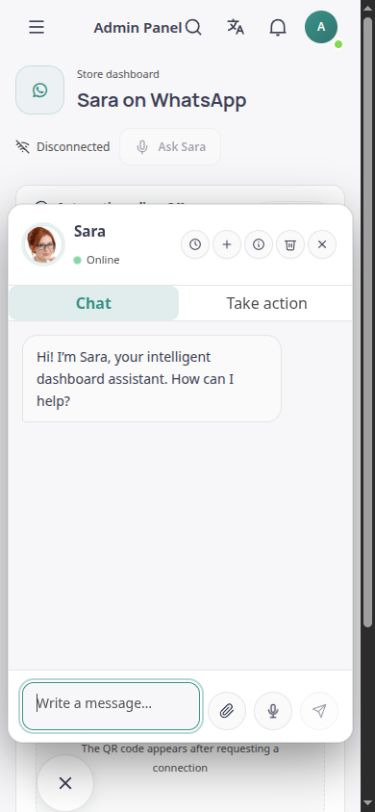
Customer communication tools and the Sara assistant in the English ASMA Shop workspace.
In the storefront, Sara answers customer questions about products and the store’s recorded information. Catalogue information, selling prices and verifiable stock availability provide context for the response, giving customers a shorter route to answers to common questions.
In the private workspace, Sara can also help prepare a reply to a customer message. A suggested reply is separate from sending a message. An authorised administrator or team member reviews the wording and decides what to do next. Requests about personal accounts and orders require the customer to sign in with a valid session.
The response uses the identity and catalogue of the same business. Information from other stores is not made available to the customer.
The product name, descriptions, selling price and verified stock status provide the basis for answers about products.
The language and tone of the conversation are considered when preparing a reply. English text can also be used in the same workspace.
The drafting tool turns the message and authorised conversation context into a reply that can be reviewed.
Customers must sign in with their own accounts to follow up on personal order information or submit a support request.
If a price, stock figure or specific answer is missing from the data, the response must not present it as certain or invent it.
Enter and maintain the catalogue and reliable store information in ASMA Shop.
When Sara and the response service are enabled, customers can ask questions within the store.
Private requests and actions such as returns follow the customer’s access rights and the support process.
Public store responses are separated from private customer account data and management tools.
Using Sara’s features depends on store activation, role permissions and service readiness.
A draft reply is not a sending receipt and does not replace an administrator’s review of sensitive decisions.
Answers to practical questions about Customer support.
No. Public conversation does not reveal other customers’ information, purchase costs, profit margins or internal store settings.
No. Drafting and sending are separate steps. Sending requires a connected communication channel and valid authority.
Accurate store information, enabled Sara access, appropriate permissions and a ready intelligent service are required. The capabilities of each account depend on its settings.