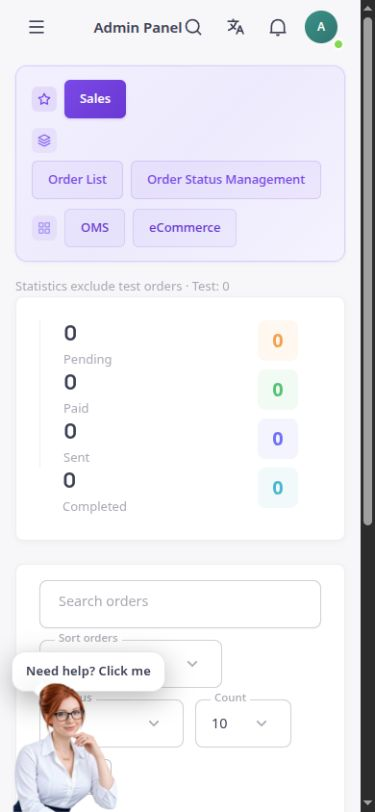
List and search
Find orders using search, status filters, sorting and a choice of how many records appear per page.
Follow orders, customers, payments and delivery status together in one traceable workflow.
The actual orders section in the English ASMA Shop dashboard.
Order management starts with an amount, but it does not end there. ASMA Shop connects the order list to product details, customers, addresses and payments, bringing the information needed for fulfilment together in one record.
The order list supports search, status filtering and changes to the display order. Everyday processing distinguishes statuses such as pending, paid, shipped, completed, cancelled and refunded.
The details page separates the subtotal, discount, tax, delivery charge and total. Status changes are made from the same record, while situations needing human review, such as a payment received after cancellation, are identified separately.
Find orders using search, status filters, sorting and a choice of how many records appear per page.
View items, quantities, unit prices and line totals alongside customer information and the delivery address.
Review the subtotal, discount, tax, shipping charge and final amount separately.
Follow the order from pending and paid through shipping and completion, and perform permitted cancellation actions when needed.
The payment method and status appear in the order record, with inconsistent cases flagged for further review.
With the required permission, export the order list as CSV or copy the authorised data.
Use search or filters to locate the order in the list and open its record.
Compare the items, amount, customer, address and payment status with the actual order.
After the real work has been done, record the next permitted status and follow the result in the same record.
The order record makes the customer identity and recorded contact details available to the team handling it.
Order counts and status summaries appear alongside the paginated list.
Recording a status is not treated as proof of a successful payment or shipment. Record alerts help the team investigate discrepancies.
Answers to practical questions about Order management.
No. The store team should record the status after the actual action. Marking an order as shipped does not replace handing it to the carrier.
No. Export depends on user permissions and is available only to users with the relevant access.
No. Order and refund statuses must be reconciled with the payment and the actual return-of-funds process. The financial record and payment receipt provide the basis for review.