Stock by variant
Inventory is displayed by variant and SKU, keeping different colours, sizes or models distinct.
Distinguish stock on hand, reserved stock and sellable quantities, and record adjustments with a reason.
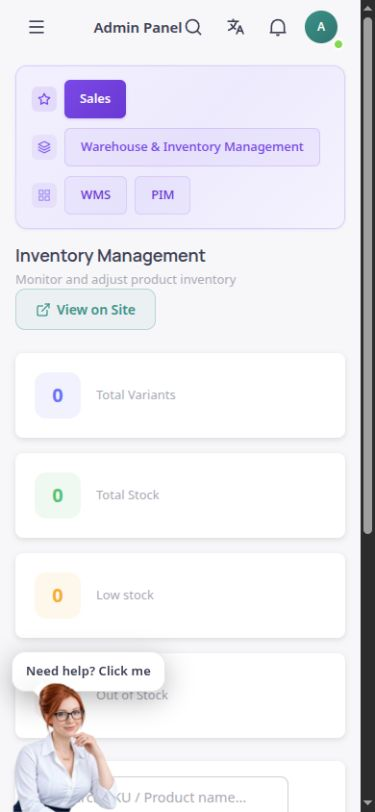
The actual inventory section in the English ASMA Shop dashboard.
A stock figure is useful when it is clear how many units are on hand and how many are reserved for orders. The ASMA Shop inventory section separates these quantities for product variants.
Product names, SKUs, total stock, reservations and sellable quantities appear in one list. Summaries at the top show the number of variants, total stock, low-stock products and out-of-stock products.
To adjust inventory, enter an increase or decrease and explain the reason. If several warehouses are configured, the relevant warehouse must be selected, so an ambiguous adjustment is not applied to every location.
Inventory is displayed by variant and SKU, keeping different colours, sizes or models distinct.
View recorded stock on hand, reserved quantities and sellable quantities separately.
Use the low-stock filter to separate items needing attention from the complete list.
Select the out-of-stock status to find products with no available stock more quickly.
Record a numerical increase or decrease with a reason, then see the updated result in the list.
Where several warehouses exist, their stock is distinguishable and each adjustment must apply to a specific warehouse.
Check the stock summary and search by product name or SKU, or use low-stock and out-of-stock filters.
Check displayed quantities against the actual goods and the relevant reservations.
If there is a discrepancy, select the warehouse and adjustment amount, enter a reason and check the result again.
Product names and SKUs provide two direct ways to find an inventory row.
Review variant counts, total stock and the number of low-stock or out-of-stock items at a glance.
An adjustment request also carries the expected stock and reserved quantities, helping control discrepancies caused by simultaneous changes.
Answers to practical questions about Inventory management.
No. Part of the stock may be reserved. Before deciding to sell, check the sellable quantity alongside stock on hand and reservations.
No. If there is more than one warehouse, the adjustment location must be specified. Where there is one warehouse, it can be used as the default.
The confirmed features on this page are stock visibility, reservations, low-stock and out-of-stock status, and documented adjustments. Transfers between warehouses or supplier purchasing should not be assumed active without checking their relevant sections.